Creating Custom Indicators and Trading Bots in ATAS
The ATAS platform allows you to develop custom indicators and trading bots. This functionality enables you to extend the platform, create your own analytical tools, and automate trading strategies tailored to your requirements.
Programming Language
Custom indicators and trading bots are developed using the C# programming language. Basic knowledge of object-oriented programming and C# is recommended.
Official Documentation
The official ATAS documentation for indicator and trading bot development is available here:
The documentation includes information about:
- platform architecture;
- base classes and interfaces;
- indicator development examples;
- market data processing;
- development guidelines and limitations.
GitHub Examples
Example source code for custom indicators is available in the official ATAS GitHub repository:
https://github.com/AtasPlatform/Indicators
The repository contains ready-to-use examples that can be used as references or as a starting point for your own projects.
Developers Community
You can communicate with other developers, ask questions, and discuss implementation details in the official Telegram developers chat:
https://t.me/+Afb9R7MEDqY3MDUy
The developers chat is intended for discussing documentation, implementation approaches, and custom development with other ATAS users.
Technical Support
ATAS Technical Support does not provide consultations, debugging,
or development assistance for custom indicators and trading bots.
For development-related questions, it is recommended to:
- Study the official documentation.
- Review the GitHub code examples.
- Ask questions in the developers Telegram chat.
Using Custom Indicators
Custom indicators can appear in the ATAS indicator catalog in several ways:
- Indicators developed by you.
- Indicators shared with you by other users, partners, or developers.
- Indicators distributed through the ATAS Marketplace.
If a developer grants access to a custom indicator for the email address associated with your ATAS account, the indicator is downloaded automatically and becomes available in the indicator catalog. No confirmation dialog is displayed during platform startup.
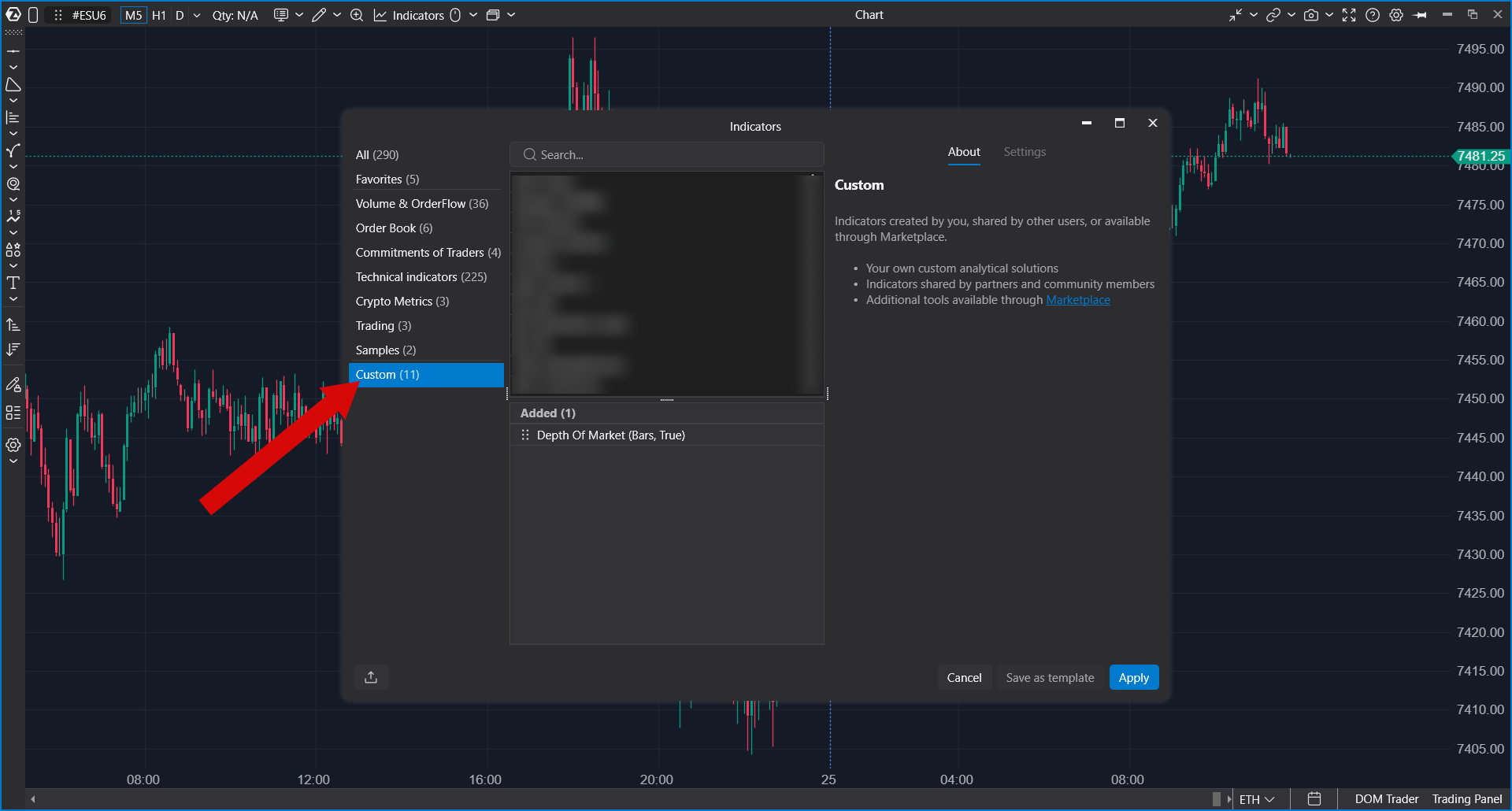
To add a custom indicator to a chart, open the indicator catalog and select the Custom Indicators category.
Managing Custom Libraries
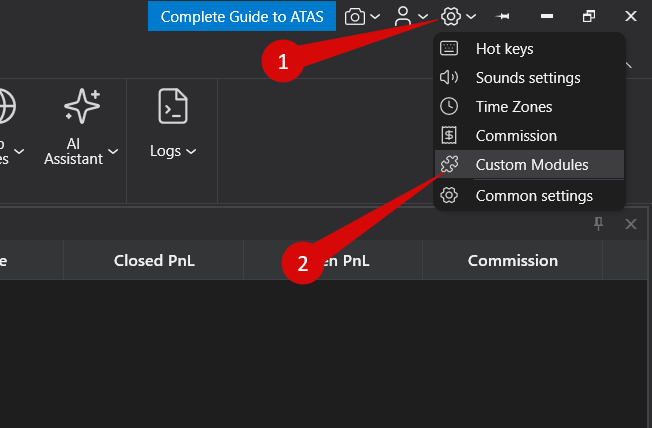
ATAS provides a library management window for custom indicators.
From this window, you can enable or disable individual custom libraries.
When a library is disabled, all indicators contained in it are hidden from the indicator catalog and cannot be added to charts until the library is enabled again.
Disabling or enabling a library only affects its availability within the platform. ATAS Technical Support does not modify, configure, or debug third-party or custom indicator code.
ATAS Marketplace
Additional custom indicators are available through the ATAS Marketplace:
https://marketplace.atas.net/algotrading/indicators
Marketplace indicators are developed and distributed independently. Availability, licensing terms, updates, and technical support depend on the individual developer or vendor.
Was this article helpful?
That’s Great!
Thank you for your feedback
Sorry! We couldn't be helpful
Thank you for your feedback
Feedback sent
We appreciate your effort and will try to fix the article